Create an API key
In the portal under Settings › Organization › API keys, create a key with class, permissions, and expiry. The plaintext appears exactly once.
6 minute readGetting startedUpdated: 10/25/2026
Before you start
- For
- Developers who are building an integration with the Szenera API
- Prerequisite
- an account with the permission
identity.api-key.create(by default: the Owner role) in an organization whose package includes API access: from the Premium package (“API and webhooks”) and with Enterprise, or enabled by contract - Where in the portal
- Settings › Organization › API keys
After this guide, you have a key ak_… with exactly the permissions your integration needs, and an expiry date. The plaintext appears exactly once, when you create the key.
Steps
-
Open Settings › Organization › API keys and click Create key. The Create API key dialog opens: “Set a name and permissions; the plaintext key is shown exactly once afterwards.”
-
Under Name (1), enter what the key is for. The portal suggests “CI import” as an example. The name later appears in the list and in logs.
-
Under Permissions (2), choose a Class. Read only is preselected:
Class What the key may do Read only Fetch content, media, schedules, locations, displays, advertising, and proofs. Change nothing. Media automation Upload media and manage folders. Content authoring Create and change scenes and templates. Playout control Manage playlists and schedules. Full access Everything your account may do through the API. Custom Individual permissions, each explained. Below the cards, it says how many permissions the choice includes. For Read only with the full permissions of the Owner role, it reads “Includes 19 permissions.” The number is limited to your own permissions. With Adjust individual permissions (3), you open the selection from the permission catalog (Search permission …, Add permission). With Custom, it is open at once.
-
Under Valid until (4), choose the lifetime: In 30 days, In 90 days (default), In one year, or No expiry. The list marks keys with no expiry separately.
-
Under Old key valid until (5), choose how long the old value stays valid next to the new one when you rotate the key later: Invalid immediately, 1 hour, 24 hours (default), or 3 days.
-
Click Create (6). The box API key — visible only now shows the plaintext: “Copy it now and store it safely; it will never be shown again.” Click Copy key, store the value in your secret store, and confirm with Got it.
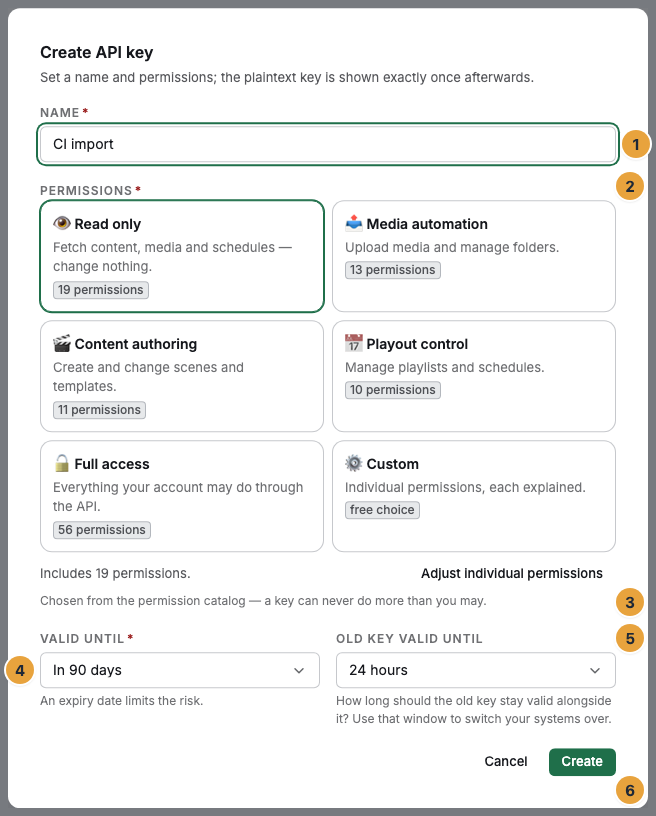
The numbers in the picture mark the controls, not the steps. Class, lifetime, and rotation period are in one dialog together, and the plaintext appears only afterwards.
Three rules apply to every choice. A key can never do more than you can yourself, so the classes are limited to your own permissions. Only key-capable permissions are offered. A class is resolved into concrete permissions when the key is created and is not updated afterwards: if the permission catalog grows, an existing key must not be able to do more overnight.
Options
Rotate. Actions › Rotate opens Rotate key: the key “gets a successor with the same permissions. The new key is shown to you once.” You choose how long the old one stays valid next to it (Invalid immediately to 3 days), and the message “Key rotated — the old one stays valid until …” names the time.
Revoke. Actions › Revoke and the confirmation Revoke key? make the key invalid immediately and permanently. Running integrations lose access.
Through the API. POST /v1/me/api-keys creates the same key (permission identity.api-key.create). A key cannot issue another one, and the route expects a session token (eyJ…) from POST /v1/auth/login. The body has name, scope (list of permissions, at least one), expiresAt (mandatory, null means no expiry), and optionally originClass (default custom) and rotationGraceHours (0–72, default 24). originClass records only the origin for display, so the permissions themselves must be listed in scope. The 201 response carries the plaintext once under plainKey. Fields and lifecycle: Authentication: keys and sessions.
Through the command line. szenera api-key issue --name="Mediathek-Roboter" --permissions=asset.list,asset.read. --list-allowed shows the allowed permissions. The command needs a profile with password sign-in, not a key profile (see Profiles and credentials). All flags: Commands for your organization.
Check the result
- The call
GET /v1/mewith the headerAuthorization: Bearer ak_…answers with200and your account (see Your first call with curl). - The list under Settings › Organization › API keys shows the new entry with Name / permissions, Class, Created by, Valid until, and Last used. At first it reads “Never used”, and after the first call it shows a timestamp.
GET /v1/me/api-keysreturns your own keys, also when called with the new key itself: the IDakm_…and the prefixak_plus nine characters, never the plaintext.GET /v1/api-keysshows all keys of the organization (permissionidentity.api-key.list).
If something goes wrong
| Symptom | Meaning | Solution |
|---|---|---|
| Create key is disabled. Above it, it says “Existing keys keep working and can be revoked at any time. Issuing or renewing a key needs the … package.” | The organization’s package does not include API access. | Choose a package from Premium or agree on the enablement by contract. Existing keys keep working. |
The API answers POST /v1/me/api-keys with 402 Billing.AddonRequired |
The same through the API: the API access capability is missing. | as above |
| A class includes fewer permissions than expected | The class is limited to your own permissions. | An account with the missing permissions creates the key, or your role is extended. |
403 Permission.Denied on POST /v1/me/api-keys with a key ak_… |
A key cannot issue a key. | Use a session token or create the key in the portal. |
403 ApiKey.ScopeEscalationBlocked |
The requested scope exceeds your own permissions. | Reduce the scope. |
422 ApiKey.ScopeNotKeyCapable |
A chosen permission is not meant for keys. details names it. |
Remove the permission. szenera api-key issue --list-allowed shows the permitted ones. |
| You see only your own keys (“You are seeing your own keys. Other members' keys are reserved for accounts with administrative rights.”) | You lack identity.api-key.list. |
An account with this permission sees all keys of the organization. |