Create a webhook endpoint
Enter an https address and the subscribed events under Settings › Organization › Webhooks, and store the signing secret safely.
5 minute readWebhooksUpdated: 10/25/2026
On this page
Before you start
- For
- Anyone who wants to connect their own system to platform events.
- Prerequisite
- A package that includes webhooks (Premium and above), the Owner role, and a publicly reachable https address that accepts POST requests.
- Where
- Settings › Organization › Webhooks, or the API at
/v1/webhooks.
By the end, your organization has an active endpoint that receives the chosen events at your https address, and you have stored the signing secret safely.
Steps
In the portal
- Open Settings › Organization › Webhooks.
- Click Create endpoint. The Create webhook endpoint dialog opens.
- Under Endpoint URL, enter the address of your receiver, for example
https://example.com/hooks/signage. - Under Subscribed events, choose the event types in the Search event … field. The field filters the catalog, and each choice appears as a chip above the field. At least one event is required.
- Click Create.
- The Signing secret — visible only now box appears. Click Copy secret and store the value where your receiver reads it. Only then click Got it.
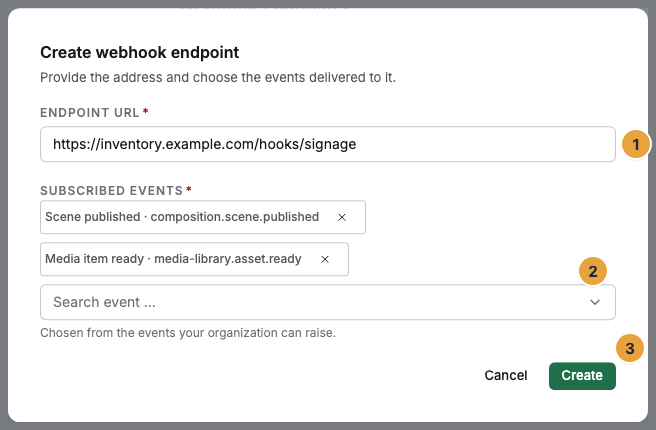
Create becomes available only when an address is entered and at least one event is in the selection as a chip.
Through the API
$TOKEN is the access token from signing in as Owner. An API key cannot carry the webhook permissions (see Authentication). $SZENERA_API is the base URL of your environment.
curl -X POST "$SZENERA_API/v1/webhooks" \
  -H "Authorization: Bearer $TOKEN" \
  -H "Content-Type: application/json" \
  -d '{
    "url": "https://warenwirtschaft.example.com/hooks/signage",
    "events": ["composition.scene.published", "scheduling.playlist.updated", "media-library.asset.ready"]
  }'
The response (status 201) contains the endpoint and, only in this response, the secret:
{
  "endpoint": {
    "id": "whk_01KPR20K40WEBHK00000000001",
    "tenantId": "tnt_01KERPXZM0ADERAPTHEKE00001",
    "url": "https://warenwirtschaft.example.com/hooks/signage",
    "events": ["composition.scene.published", "scheduling.playlist.updated", "media-library.asset.ready"],
    "active": true,
    "consecutiveFailures": 0,
    "lastDeliveryAt": null,
    "lastFailureAt": null,
    "createdById": "usr_01KFB7QPW0TEAM000000000002",
    "createdAt": "2026-04-21T13:00:00.000Z"
  },
  "secret": "whsec_9tR4mZpQ2xVs7KdHc3JnFb6yWa8EgTu1"
}
The secret cannot be retrieved afterward. If it gets lost, renew it (see Options).
The server checks the events list before it creates the endpoint. Allowed values are an exact event type, an area such as composition.*, or * for everything. An unknown name is 422 WebhookEndpoint.EventUnknown and is named in the response. A typo should stand out here and not end up as an endpoint that stays silent. GET /v1/webhooks/event-types returns the names that exist, see Fetch the event catalog through the API.
Options
| Task | In the portal | Through the API |
|---|---|---|
| Change the address or events | Edit → Edit webhook dialog → Save | PATCH /v1/webhooks/{id} with url and/or events |
| Pause or resume an endpoint | Deactivate / Activate | PATCH /v1/webhooks/{id} with {"active": false} or {"active": true} |
| Renew the secret | Rotate secret → new Signing secret — visible only now box | POST /v1/webhooks/{id}/rotate-secret → response {"secret": "whsec_…"} |
| Remove an endpoint | Delete → Delete webhook endpoint? dialog → Delete | DELETE /v1/webhooks/{id} → {"deleted": true} |
| List endpoints | List under Webhook endpoints | GET /v1/webhooks?limit=50 (page with cursor) |
When you edit an endpoint, the signing secret stays unchanged. A deactivated endpoint keeps its address, events, and delivery history. Added events and a re-enabled endpoint take effect up to an hour later. Newly created endpoints take effect immediately.
Rules for the address and events
- https only, public only. The address begins with
https://. The server rejectslocalhost,::1, names ending in.local, and the ranges127.,10.,192.168.,169.254., and172.16.through172.31.. The response is status 422,WebhookEndpoint.UrlInvalid, both when creating and when changing. - At least one event, known names. Allowed are an exact event type, an area such as
composition.*, and*. A typo in the type is rejected with422 WebhookEndpoint.EventUnknown, and so is a type that cannot be subscribed to. - The package counts when you create an endpoint and when you renew the secret. Without webhooks in the package, creating an endpoint returns status 403,
Billing.FeatureNotEntitled. In the portal, Create endpoint and Rotate secret are locked, whilePOST /v1/webhooks/{id}/rotate-secretremains possible through the API. Existing endpoints keep running. - Permissions. Creating, changing, renewing, and deleting require the Owner role (
webhook.create,webhook.update,webhook.delete). Owners and Managers see the list (webhook.list).
Check the result
- The endpoint appears in the Webhook endpoints list with the status Active.
- After the next matching event, the Delivery log shows a row with the status Delivered and the response code of your server (for example “HTTP 200”).
- Your receiver has seen a request with the headers
X-Signature,X-Event-Type, andX-Delivery-Id.
If something goes wrong
| Symptom | Meaning | Solution |
|---|---|---|
Status 422, WebhookEndpoint.UrlInvalid |
The address is not https or points to a private network | Use a public https address |
Status 403, Billing.FeatureNotEntitled. In the portal, Create endpoint and Rotate secret are locked |
Your package does not include webhooks | Change the package. Existing endpoints can still be edited, switched off, and deleted |
Status 403, Permission.Denied |
Your account does not have the Owner role, or you are calling with an API key | Sign in as an Owner. Use the access token of a sign-in instead of an API key |
Status 422, WebhookEndpoint.EventUnknown |
An entry in events matches none of the three allowed forms. details.unknownEvents names it |
Check the name against the event catalog |
| The endpoint is active, but no delivery ever arrives | The event does not occur, or the subscribed events are not yet in effect | See When no delivery arrives |